MyEEB1 v3.0
  • Home
  • Absences
  • Schedule
  • CdE Posts
  • Events
  • Canteen and Cafeteria
  • Other
    Useful Links School Map EPAS EEB1 and ES info About Settings Staff Login
    EN FR DE

Let's get you started!

Before starting, ensure that MyEEB1 is added to your home screen, as the feature requires it. First, our system needs to retrieve your courses from the school's database.

Step 1: Open the sms.eursc.eu portal and log in.

Step 2: Once logged in, open your schedule.

Step 3: In the top right corner, find the "Get iCal" button (as shown below).
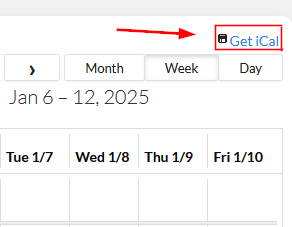
The location of the Get iCal button on the sms.eursc.eu screen.

Step 4: Press and hold the button, then select "Copy link address" (or "Copy") to copy the link.


Setup Complete!

Your courses have been saved. You will now receive notifications about cancellations.

CdE EEB1 Contact

To contact the CdE write us an email to [email protected], or check out our Instagram. To contact our school, please visit the official website.

Quick Links

  • EEB1 Website
  • APEEE Website
  • BAC Past Exams (S7)
  • Eurscmag
  • EURSC
  • Syllabuses
  • CoSup
  • Complaints Board

By the CdE

  • CdE Instagram
  • CdE Facebook
  • CdE News and Events
  • CdE Team
  • Privacy Policy
  • About the App

© Copyright CdE EEB1 All Rights Reserved.

Designed by Leo Florea and programmed by the CdE MyEEB1 Team